Revenue Per Hour: The Cam Model Metric Most Creators Ignore
Most cam models track total earnings. A stream that earned $300 looks better than one that earned $160. But if the $300 stream took 8 hours and the $160 stream took 2, you earned more per hour in the shorter one. That is where revenue per hour changes everything.
What Is Revenue Per Hour?
Revenue per hour measures how much money you earn for each hour you are live. The formula is simple:
| Stream | Earnings | Hours | Revenue / Hr |
|---|---|---|---|
| Stream A | $240 | 4 hrs | $60/hr ✓ |
| Stream B | $300 | 8 hrs | $37.50/hr |
Stream B made more total money — but Stream A was 60% more efficient. If you ran Stream A twice, you'd earn $480 in 8 hours vs Stream B's $300 in the same time.
Why Total Earnings Can Be Misleading
Total earnings alone don't show:
- How long you worked
- Whether the stream was efficient
- Whether you were online during profitable hours
- Whether earnings dropped after several hours
- Whether one whale created most of the income
- Whether the same result could have happened in less time
This matters because camming is energy-based work. Burnout is real. If you can make the same amount in fewer hours, that changes your entire schedule, your recovery, and your long-term sustainability.
Why Revenue Per Hour Matters
Revenue per hour helps you answer better questions:
Instead of asking "How much did I make?" you start asking: "Was this stream worth the time?" That is a much better business question.
Example: Two Models, Very Different Results
| Model A | Model B | |
|---|---|---|
| Weekly hours | 25 hrs | 60 hrs |
| Weekly earnings | $1,250 | $1,800 |
| Revenue / hr | $50/hr | $30/hr |
| Efficiency | ✓ More efficient | ✗ Less efficient |
Model B earns more total money — but she works 2.4× as many hours to get it. Model A earns 67% more per hour. That gap likely reflects a better schedule, stronger audience timing, better whale retention, or smarter session structure.
More Hours Do Not Always Mean More Money
A common mistake is assuming that staying online longer automatically increases earnings. Sometimes it does. But sometimes earnings drop sharply after the strongest part of the stream is over.
The creator's peak window was hours 2–3. Staying online for hours 4–6 added $70 in total — but at less than $20/hr, far below her session average. Stopping at hour 3 with $210 earned would have been more efficient than earning $280 across 6 hours.
Session Fatigue: The Hidden Earnings Killer
Many creators experience a session fatigue curve. A session may start slow, peak in the middle, then decline near the end. This can happen because:
- Energy drops as the stream goes on
- Regulars leave after the main goal resolves
- Engagement and room momentum slow
- High-spending viewers already tipped earlier
- The creator becomes less interactive
If you only look at total earnings, you may think the entire stream was equally valuable. Revenue per hour shows that only certain hours were truly profitable — and that the rest was diminishing returns.
Best Streaming Hours vs Best Streaming Days
Revenue per hour also separates strong days from strong hours. Saturday may bring the most total earnings because you stream longer on Saturdays. But Thursday night might earn more per hour.
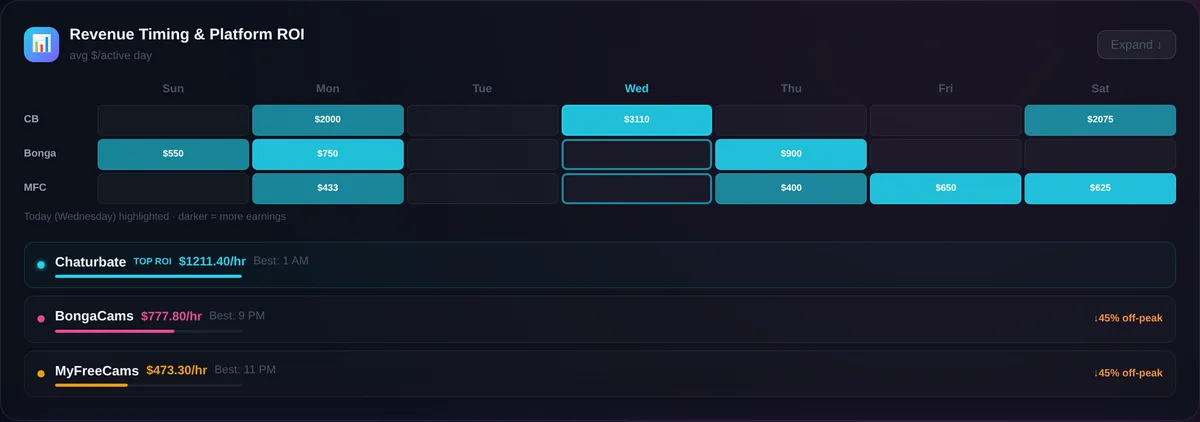
| Day | Hours | Total Earned | Revenue / Hr |
|---|---|---|---|
| Saturday | 8 hrs | $320 | $40/hr |
| Thursday | 3 hrs | $210 | $70/hr ← more efficient |
Saturday made more total money. Thursday was more profitable per hour. That is the kind of insight that helps you build a smarter schedule — prioritizing efficient windows over long, low-yield streams.
Why Peak Hours Are Personal
Generic advice — "stream at night" or "stream on weekends" — is not enough. Your best earning hours depend on:
One creator may earn best on Friday nights. Another may earn best on Tuesday afternoons because her biggest tipper logs on during lunch. That is why your own earnings history is more valuable than any generic advice.
See the full breakdown: Best Time to Stream on Chaturbate →
Revenue Per Hour and Whale Fans
Revenue per hour becomes even more powerful when combined with top tipper analysis. A stream may perform well not because the platform was busy, but because one or two high-value fans showed up.
A busy room is not always a profitable room.
Sometimes the best hour is not the hour with the most viewers — it is the hour with the highest spending. If your highest-spending fans appear during certain windows, those hours may be more important than any general traffic pattern.
See the full guide: Cam Model Top Tipper Tracker →
How to Calculate Revenue Per Hour Manually
Three steps:
You can also calculate weekly revenue per hour:
This gives you a clearer view of your actual earning efficiency — not just what you made, but whether the time was worth it.
What Revenue Per Hour Can Reveal
Tracking revenue per hour can help you find:
- Your most profitable streaming days and hours
- Your weakest streaming windows
- Your best session length before earnings drop
- Whether longer streams help or hurt
- Whether certain platforms perform better per hour
- Whether your top tippers appear at predictable times
- Whether your earnings efficiency is improving or declining
This turns your stream history into a strategy tool rather than just a record of what happened.
How CamCash Helps
CamCash helps creators analyze earnings patterns instead of guessing. Upload your earnings history and review revenue by hour, by day, by session, and by top tipper. Instead of only seeing how much you made, CamCash shows you when and how you make it.
That is the difference between tracking earnings and using earnings data to make better decisions.
Final Takeaway
Revenue per hour is one of the clearest ways to understand your real performance as a cam model.
Total earnings tell you what happened.
Revenue per hour tells you how efficient it was.
If you want to improve your schedule, avoid wasted hours, reduce burnout, and focus on your most profitable windows — this is one of the first metrics you should track. Your goal is not just to stream more. Your goal is to stream smarter.
Frequently Asked Questions
What is revenue per hour for cam models?
Revenue per hour is the amount of money earned divided by the number of hours streamed. It shows how efficiently you earn during a stream, rather than just showing total income.
Why is revenue per hour important?
It reveals how efficiently your time is being used. A short, high-earning stream may be more valuable than a long, low-earning one. Total earnings alone are misleading because they don't show how many hours it took.
Is total revenue still important?
Yes, but total revenue does not show how long it took to earn that amount. Revenue per hour gives you the context needed to evaluate whether a session was actually efficient.
Do longer streams always earn more money?
Not always. Many sessions follow a fatigue curve where earnings peak in the first 2–3 hours then decline. Staying online past the peak window increases total revenue slightly but reduces revenue per hour.
How can I improve revenue per hour?
Analyze your best hours, best days, top tippers, and session length patterns. Stream during your personal peak windows, end sessions before earnings-per-hour drops significantly, and focus on re-engaging your highest-spending fans.
What is a good revenue per hour for cam models?
There is no universal number. The best benchmark is your own historical performance — your average, your top 10% hours, and your trend over time. The goal is to improve your own rate.
Can CamCash calculate revenue per hour?
Yes. CamCash analyzes your uploaded earnings history and shows revenue by hour, by session, and by day — including per-hour breakdowns that reveal your most and least efficient streaming windows.