Cam Model Income Tracker
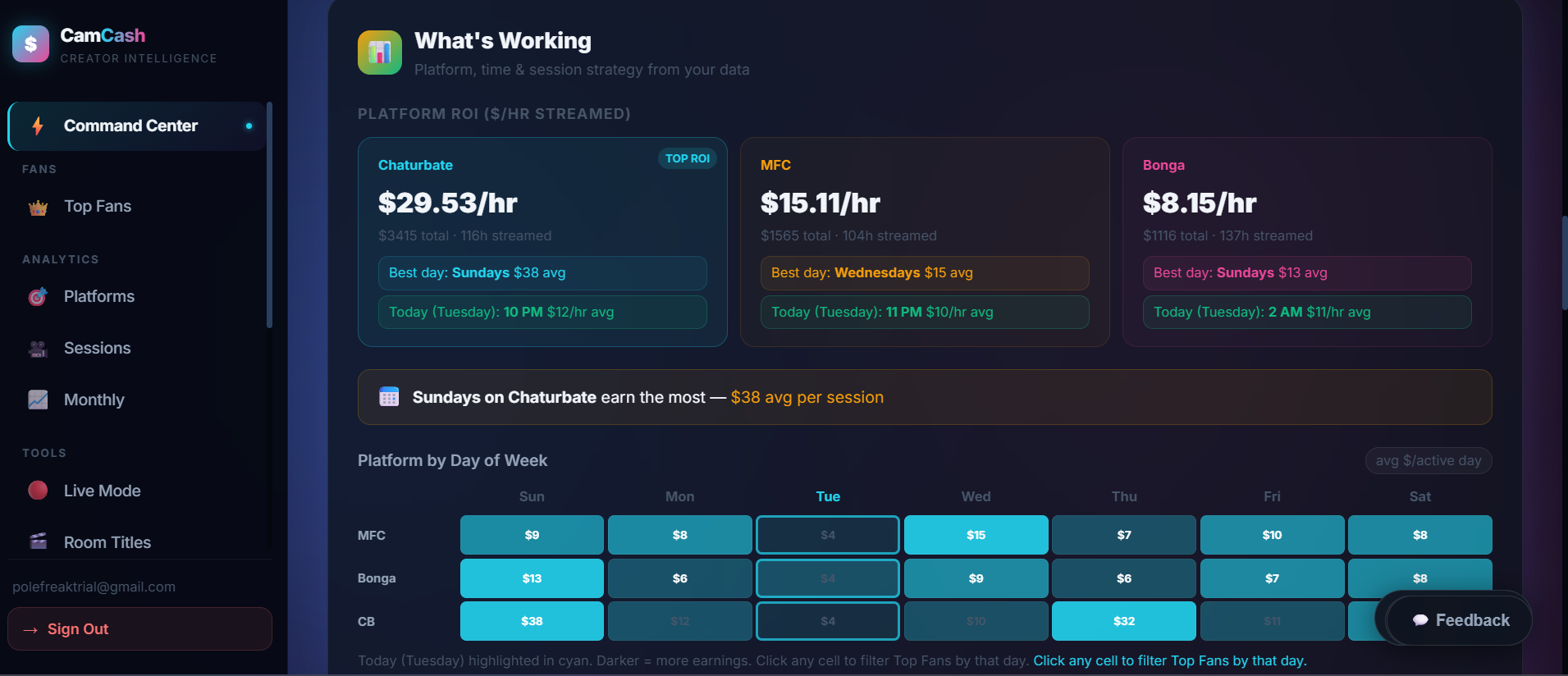
Tracking total monthly tokens tells you almost nothing. CamCash tracks your cam income by session, hour of day, platform, and individual fan — so you can see your real earnings per hour, identify your peak windows, and know which fans are responsible for most of your income. Upload your CSV to get started.
What Is a Cam Model Income Tracker?
A cam model income tracker is a tool — a spreadsheet, an app, or an automated dashboard — that records your streaming earnings in enough detail to actually analyze them, instead of just totaling them up. At minimum, that means recording:
- Gross earnings (tokens and/or USD)
- Estimated model payout after platform take
- Platform (Chaturbate, BongaCams, MyFreeCams, etc.)
- Tokens, when the platform pays in tokens rather than USD directly
- Private-show income, tracked separately from public tips
- Stream duration per session
- Earnings per hour streamed
- Top tippers, ranked by spend
- Daily, weekly, and monthly totals
- Business expenses, for models tracking profit and taxes
Some models do this in a spreadsheet, some use a per-platform export, and some use an automated tool like CamCash. The right choice depends on how much manual entry you're willing to do versus how much you want calculated for you automatically — more on that trade-off below.
What Should Cam Models Track?
Not every number matters equally. These are the ones that actually change what you do next:
| Metric | Why It Matters |
|---|---|
| Total earnings | Measures overall revenue |
| Hours streamed | Shows how much time was worked |
| Earnings per hour | Identifies your most profitable sessions |
| Platform | Compares performance across the sites you stream on |
| Top tippers | Shows how concentrated your revenue is |
| Private-show earnings | Separates private income from public tips |
| Expenses | Needed for accurate profit and tax records |
Why a Monthly Total Isn't Enough
A single number at the end of the month tells you what happened, but never why. It can't tell you whether last Tuesday's session underperformed because of the hour, the platform, or because your top fan didn't show up. Without a breakdown, every good or bad month feels like a coin flip instead of something you can actually improve on.
The 4 Things Worth Tracking
How to Track This Manually With a Spreadsheet
You can build this yourself from your platform's tip history export. Here's the manual version of what CamCash automates:
For the hour-of-day piece specifically, see best hours to stream on Chaturbate. For converting tokens to USD across platforms, see the cam model token calculator.
Spreadsheet vs. Automated Cam Income Tracker
Neither approach is strictly better — they're good at different things:
- Spreadsheets are flexible but require manual entry. You can add any custom column you want — expense categories, mileage, equipment costs — but you have to type or paste every row in yourself, every time.
- CamCash imports platform data directly from your CSV export, so session, hour, platform, and fan breakdowns are calculated automatically instead of built by hand.
- Spreadsheets are still useful for expenses and tax categories — that kind of freeform bookkeeping is exactly what they're built for.
- CamCash is better for fan behavior, session patterns, and platform comparisons — the analysis that requires crunching hundreds of timestamped rows, which is slow and error-prone by hand.
Most models end up using both: CamCash for earnings analysis, a simple spreadsheet for expenses and tax prep. See cam model self-employment tax prep for what to track for that side of it.
How CamCash Automates Your Income Tracking
The manual version above works, but it means rebuilding the same spreadsheet every month. CamCash does it from a single CSV upload:
- Session-by-session earnings and $/hr, calculated automatically from your upload
- Peak earning hours ranked by $/hr, not just total tips received
- Platform comparison if you stream on more than one site
- Top fans ranked by lifetime spend, with alerts when a regular goes quiet
See why cam income is inconsistent for the most common patterns this kind of tracking uncovers, and how to fix each one.
Upload your CSV and see your earnings broken down by session, hour, platform, and fan — free, in under two minutes.
Track My Income →Cam Model Income Tracker FAQ
Track it at four levels: per session, per hour of day, per platform, and per fan. A single monthly total tells you that you earned a number — it never tells you why. Breaking earnings down across those four dimensions is what turns raw tip history into decisions you can act on.
A spreadsheet works, but it requires manually exporting CSVs from each platform and rebuilding the same formulas every month. CamCash automates this — upload your CSV once and it calculates session earnings, $/hr by time of day, platform comparison, and top-fan spend automatically.
It depends what you're tracking. Spreadsheets are still the more flexible option for business expenses and tax categories, since they're built for arbitrary custom columns. CamCash is better suited to fan behavior, session patterns, and platform comparisons — the parts that require analyzing hundreds of timestamped rows, which is tedious by hand.
USD, whenever your platform gives you a payout figure — it's the real source of truth. Use your platform's token-to-dollar rate as a fallback only when a USD figure isn't available, since that rate can vary by platform and payout tier.
Weekly for session and hourly patterns, and every 2–3 months for peak-hour and platform-allocation decisions, since audience behavior shifts over time.